Intel or AMD: Which Processor Is Better in 2026?
Choosing between Intel and AMD is no longer as simple as picking whichever brand has the faster-looking specifications. Both companies make powerful processors, but their strengths can differ depending on whether you care most about gaming, productivity, price, laptop battery life, or future upgrades.
For a gaming-focused desktop, AMD currently has a particularly strong position thanks to its Ryzen X3D processors. Intel, however, remains highly competitive, especially in some mainstream and budget categories. The best choice ultimately depends on the specific processors and the system you are building.
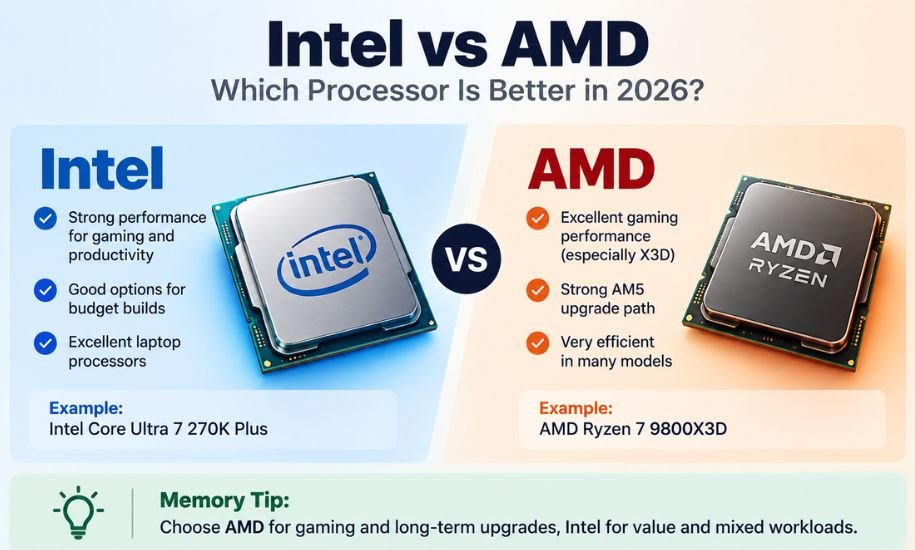
For a new gaming desktop, AMD is generally the stronger choice, particularly with its Ryzen X3D processors. Intel remains a good option for budget-conscious buyers and productivity-focused systems, while laptop buyers should compare the complete machine rather than choosing a processor brand alone.
Intel vs AMD at a Glance
| Feature | Intel | AMD |
|---|---|---|
| Gaming | Excellent | Excellent, especially X3D |
| High-FPS gaming | Very strong | Current advantage |
| Budget builds | Competitive | Competitive |
| Productivity | Excellent | Excellent |
| Multicore workloads | Very strong | Very strong |
| Efficiency | Improved considerably | Excellent in many models |
| Desktop upgrade path | More limited | Strong AM5 advantage |
| Gaming laptops | Excellent | Excellent |
| Best for | Mixed workloads and value deals | Gaming and long-term AM5 builds |
The table is a broad comparison rather than a rule. A particular Intel processor can beat a particular AMD processor, and vice versa.
Why the Choice Is More Complicated Than It Looks
Intel and AMD compete across several processor families and price ranges. Comparing the brands alone can therefore be misleading.
For example, a high-end AMD Ryzen 9 should not be compared with an entry-level Intel Core Ultra 5 simply because both are modern processors. Price, core count, architecture, cache, power limits and intended workload all affect the result.
This is especially important when comparing a desktop CPU with a laptop processor. Laptop manufacturers can configure processors differently depending on cooling, battery capacity and power limits.
The better question is usually:
Which specific processor gives me the performance and features I need for the money?
AMD Has a Major Advantage for Gaming
If gaming is the main reason you are building a desktop PC, AMD deserves serious consideration.
AMD’s Ryzen X3D processors use additional 3D V-Cache to provide a large amount of L3 cache. This can benefit games that respond particularly well to additional cache.
Current CPU benchmark rankings put AMD’s high-end X3D models at the top of gaming performance charts. The Ryzen 7 9850X3D, for example, is an eight-core, 16-thread processor with 96MB of L3 cache and a maximum boost clock of 5.6GHz.
That does not mean every AMD processor is faster than every Intel processor. Rather, AMD currently has a particularly compelling selection for enthusiasts who want maximum gaming performance.
Ryzen 9800X3D vs 9850X3D
The Ryzen 7 9800X3D is also an important option. Testing has shown the newer 9850X3D to be faster, but the difference is relatively small in many gaming workloads.
That makes the 9800X3D potentially attractive when it is available at a substantially lower price.
For gamers, this illustrates an important buying rule: the fastest CPU is not automatically the best-value CPU.
What About Intel for Gaming?
Intel should not be dismissed if you are building a gaming PC.
Modern Core Ultra processors can deliver excellent gaming performance, and the best choice can change when prices and availability are considered.
Intel’s newer Core Ultra 200S Plus desktop range includes processors such as the Core Ultra 5 250K Plus and Core Ultra 7 270K Plus. These models make Intel particularly interesting in mainstream and value-oriented builds.
There is also another important consideration: gaming performance depends heavily on the graphics card.
If you are playing at 4K with a demanding GPU, the graphics card will often be the main performance limitation. Spending substantially more on the CPU may therefore provide little benefit compared with investing that money in a better GPU.
Intel or AMD for Budget Gaming?
Budget buyers should compare actual processor prices rather than assuming that one brand always offers better value.
Intel’s Core Ultra 5 250K Plus is an interesting option in the lower-priced performance segment. AMD, meanwhile, has several Ryzen processors that can make sense depending on the motherboard and overall system price.
For an inexpensive gaming PC, consider the cost of the entire platform:
- CPU
- Motherboard
- RAM
- CPU cooler
- Graphics card
- Storage
- Power supply
A CPU that is slightly faster but requires a considerably more expensive platform may not be the best choice for a limited budget.
Don’t Ignore Older AMD Platforms
AMD’s AM5 platform is especially attractive for people who plan to upgrade later, but older Ryzen processors can still offer excellent value when heavily discounted.
A previous-generation processor can make sense if it allows you to put more of your budget toward the graphics card.
AMD’s AM5 Platform Is a Major Strength
One of AMD’s biggest advantages is its AM5 desktop platform.
AMD has stated that it plans to support AM5 through 2029. That gives buyers a reason to consider an AM5 motherboard as a longer-term investment.
A person who buys an AM5 system today may have opportunities to upgrade the processor later without replacing the entire motherboard platform.
This is particularly useful for people who do not want to build a completely new computer every few years.
Intel’s current desktop platform situation is less attractive from a long-term CPU-upgrade perspective, so platform longevity can be an important factor when deciding between the two.
Intel or AMD for a Laptop?
Laptop shopping is different from desktop PC building.
If you are deciding between an Intel or AMD laptop, don’t choose based solely on the processor’s brand.
Look at the entire laptop, including:
- Processor
- Graphics processor
- RAM
- SSD
- Display
- Battery
- Cooling
- Weight
- Power limits
- Price
Two laptops with similarly named CPUs can perform differently because manufacturers use different cooling systems and power configurations.
For gaming laptops, the GPU can be particularly important. A laptop with a slightly weaker CPU but a substantially stronger GPU may provide better gaming performance than a machine with a faster processor and weaker graphics.
For everyday work such as browsing, office applications, studying and video calls, both Intel and AMD offer plenty of capable options.
AMD vs Intel for Productivity
Gaming is only one part of the comparison.
People who edit video, render 3D projects, compile software, run virtual machines or perform other heavily threaded tasks should examine application-specific benchmarks.
Intel processors can deliver excellent single-threaded and multicore performance. AMD’s Ryzen 9 models are also extremely powerful for demanding workloads.
This is why a blanket statement such as “AMD is for gaming and Intel is for work” is outdated.
Both companies produce processors suitable for professional workloads.
The more useful approach is to identify the applications you use most and compare CPUs using benchmarks for those applications.
Power Efficiency Matters Too
Power consumption can affect electricity costs, temperatures, fan noise and the type of cooling system you need.
AMD’s X3D processors are particularly interesting because they can provide very high gaming performance without requiring extreme power consumption.
However, the newest or fastest processor is not necessarily the most efficient.
For example, testing of the Ryzen 7 9850X3D has shown higher power consumption than the 9800X3D while providing a relatively modest average gaming improvement.
For many buyers, that makes performance per watt more useful than simply looking at the maximum benchmark score.
What Does Reddit Say About Intel or AMD?
Reddit can be useful for understanding how PC builders approach the decision, although community opinions should not replace controlled benchmark testing.
Recent PC-building discussions tend to show considerable enthusiasm for AMD’s X3D processors among people building primarily for gaming. Users frequently point to the strong gaming performance and the AM5 upgrade path.
At the same time, many discussions emphasize that Intel remains perfectly viable when a particular processor is cheaper or better suited to a user’s workload.
This is probably the most sensible lesson from community discussions: avoid choosing a CPU based on brand loyalty.
A discounted Intel processor can be a better purchase than an expensive AMD model, just as a Ryzen X3D processor can be the obvious choice for a high-end gaming build.
Intel or AMD or Snapdragon?
Snapdragon adds another dimension to the laptop conversation because Qualcomm’s Snapdragon PC processors use ARM-based technology rather than the traditional x86 approach used by mainstream Intel and AMD desktop processors.
This means Snapdragon should not simply be treated as a third version of the same Intel-versus-AMD comparison.
For laptops, Snapdragon systems can be attractive when battery life, portability and efficiency are major priorities. However, software compatibility and application requirements should also be considered before buying an ARM-based Windows PC.
For a conventional desktop gaming PC, Intel and AMD remain the more relevant choices.
How to Choose Between Them
Instead of asking which company is universally better, start with your intended use.
Choose AMD when:
- Gaming is your main priority.
- You want a high-end X3D gaming processor.
- You value high gaming performance.
- You want an AM5 desktop system with a longer upgrade horizon.
- You care about gaming efficiency.
- You are building a new enthusiast gaming PC.
Choose Intel when:
- You find a significantly better deal on a complete system.
- A particular Intel processor performs better in your applications.
- You want strong mainstream productivity performance.
- A specific laptop has the better combination of Intel CPU, GPU, cooling and display.
- You are building around a competitive budget-oriented Intel processor.
Common Mistakes to Avoid
1. Comparing brands instead of processors
Intel and AMD each sell CPUs across numerous performance levels. Brand-versus-brand comparisons can hide major differences between individual models.
2. Looking only at clock speed
A higher advertised clock speed does not automatically mean better real-world performance. Architecture, cache, core design and workload all matter.
3. Ignoring the GPU
For a gaming PC, especially at higher resolutions, the graphics card can have a much greater impact on gaming performance than moving between two similarly capable CPUs.
4. Buying the most expensive processor
The highest-end chip is not necessarily the best value. A slightly less expensive processor can deliver nearly the same gaming experience while leaving more money for a better GPU, SSD or monitor.
5. Forgetting the motherboard
The CPU and motherboard form a platform. Check socket compatibility, memory support, expansion features and upgrade possibilities before making a purchase.
Easy Way to Remember the Difference
If you need a simple rule, think of it this way:
For a gaming-first desktop, start by looking at AMD’s X3D options. For a mixed-use or value build, compare specific Intel and AMD processors at the same price. For laptops, judge the complete machine rather than the CPU brand.
That rule is much more useful than assuming one manufacturer wins every category.
Frequently Asked Questions
Is AMD better than Intel for gaming?
For high-end desktop gaming, AMD currently has a strong advantage because of its Ryzen X3D processors. However, Intel can still provide excellent gaming performance, particularly when a specific Intel CPU offers better value at the price you are paying.
Which is better for a budget gaming PC, Intel or AMD?
There is no universal winner. Compare processors at the same price and consider the motherboard, RAM and graphics card as part of the total cost. A cheaper CPU can be the better choice if it allows you to buy a stronger GPU.
Is AMD better for laptops?
Not necessarily. AMD makes excellent laptop processors, but Intel also offers highly capable mobile CPUs. When choosing a laptop, consider the complete configuration, including the GPU, cooling, battery, display and price.
Is Intel better for productivity?
Intel remains very strong for productivity, but AMD’s Ryzen processors are also excellent for demanding workloads. The best choice depends on the applications you use and the specific CPUs being compared.
Is AMD’s AM5 platform worth considering?
Yes, particularly if you expect to upgrade your desktop later. AMD has committed to supporting AM5 through 2029, making it an appealing platform for buyers interested in longer-term CPU upgrades.
Should I buy the fastest CPU available?
Usually not. The fastest processor may provide only a small improvement over a slightly cheaper model. For gaming, it can often be smarter to balance the CPU with a strong graphics card and choose the processor that provides the best overall value.
Final Verdict: Intel or AMD?
For a new gaming-focused desktop, AMD currently has the stronger overall argument, especially if you are considering a Ryzen X3D processor. Its gaming performance and AM5 upgrade path make it particularly appealing. Intel remains a highly competitive alternative, especially when a specific Core Ultra processor offers better value or suits your workload.
The smartest choice is therefore not about loyalty to either brand. Compare the specific CPU, price, motherboard platform, power requirements and workload before buying. For clear explanations of confusing comparisons and technical terms, Grammarifyr follows a simple principle: know the difference and use the right choice.
You may also Read : Speach or Speech: Meaning and Correct Usage